| Standard |
| PDE Instructional Technology Specialist Competencies |
| Standard Used For Infographic |
| I.A. Identification, selection, installation, and maintenance of technology infrastructure, and hardware and software applications for school administration and instruction including: |
| Indicator Item |
| Design and production of media including projected and non-projected visual aids, audio and video production in both analog and digital forms, and photography using film-based and digital formats |
| Artifact |
| Postcard |
| Description |
I took GILT 521: Digital Imagery for Teachers with Dr. Heo in the fall semester of 2018. This was an online master’s course offered by Duquesne University. According to the GITL 521 syllabus, the course focuses on various uses of multimedia for enhancing course material. As a graded class assignment in week 5, I was asked to create a postcard in Photoshop that will be sent to homes for an upcoming event. I had to conform to the following requirements.
- Minimum of 4 layers
- Use of selection tool(s)
- Use of transformation/distortion/warping tools nondestructively (at least once)
|
| Reflection |
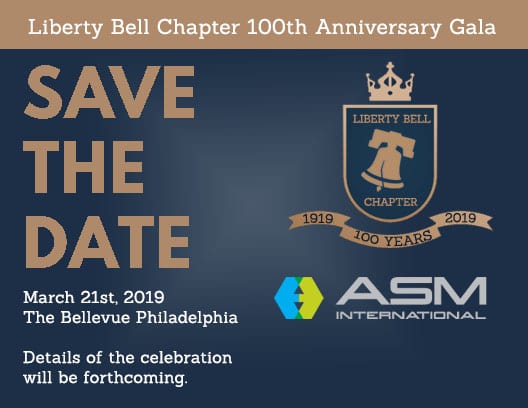
| I created a save the date postcard for a 100th-anniversary gala that will be held for the Liberty Bell Chapter (Philadelphia Chapter) of the American Society for Metals (ASM). ASM is an international professional organization for materials scientists and engineers. The gala will be held at the Bellevue Philadelphia where the first ASM meeting was held 100 years ago. This postcard will be printed and mailed to the ASM Liberty Bell Chapter members. My father in law is involved in the planning of the 100th-anniversary gala and he asked me to create a logo for the liberty bell chapter and postcard for the event. I used 8 bit RGB for my color mode and 300 ppi for my resolution. I chose these settings because the postcard will be printed and mailed to the ASM Liberty Bell Chapter members.
I enjoyed this assignment because it’s more than a sample of my work. I’m extremely proud of this image because it’s actually being used as a save the date card.
Photoshop tools and techniques I used
- I created a Background layer and used Edit < Fill to change the color to Navy Blue. This is the base layer of my postcard.
- I created a Starburst layer and used the gradient tool to create a white starburst effect. I dropped the opacity to 20%. This technique gives the postcard a soft glow and is used to draw the viewer’s eyes to the middle of the postcard.
- I used a royalty-free vector from Bigstock.com to create the crest layer. I used the rectangle selection tool and Edit < Fill to remove the Lion, Lorem Ipsum, Heraldy and text within the gold banner. Also, I used the magic wand tool to remove the background color. I saved the image as a PNG to ensure the crest was transparent. I imported my edited crest imaged into my postcard PSD file.
- I used a royalty-free vector from Bigstock.com to create the bell layer. I used the rectangle selection tool to crop out the bell. Also, I used the magic wand tool to change the bell color from blue to gold. Also, I used the magic wand tool to remove the image background color. I saved the image as a PNG to ensure the bell background was transparent. I imported my edited bell image into my postcard PSD file.
- I used the font Sanchez for the Main text of the postcard. I made the text white and made the weight Strong
- I created the text for the layers “Liberty Bell” and “Chapter” and made the font gold. I sized the text so it would fit around the bell image.
- I used the warp tool on the layers for “1919”, “2019” and “100 Years”. I used the Arc style and bent the text to fit into the ribbon of the crest image.
- With permission from ASM, I used the ASM International logo. I used the magic wand tool and removed the white background. Also, I saved the image as a PNG to ensure the background of the ASM logo was transparent. I imported my edited crest imaged into my postcard PSD file.
- I created a layer for the gold bar used at the top. I used the rectangle selection tool and Edit< Fill to create a gold rectangle. This was used as the background for the layer for “SAVE THE DATE”
- I used the font “League Spartan” for the SAVE THE DATE text on the postcard. I made the text gold, all capital letters, and bolded the font. I did this to make the text stand out.
- I placed the “Liberty Bell Chapter 100th Anniversary gala” on the gold bar at the top. I used a white font so it would stand out against the gold background. I placed this text at the top on the gold background to highlight the actual event.
|
|
|
