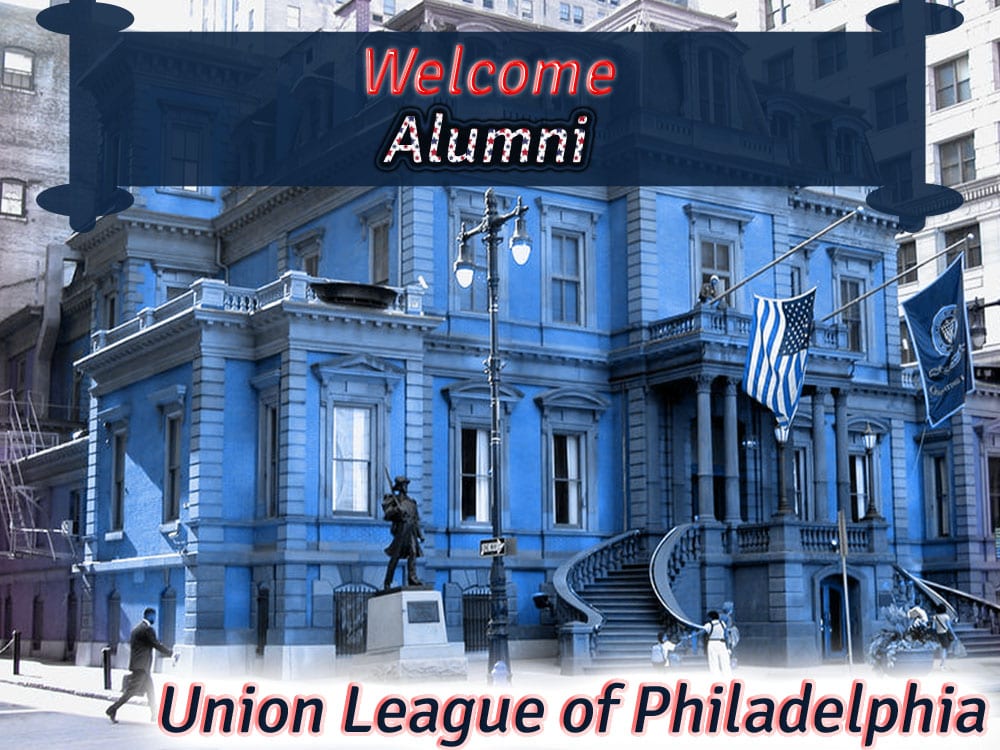
| I created a banner for an Alumni Weekend event at the Union League of Philadelphia. Since the Union League is a patriotic club and I wanted to integrate elements of red, white and blue to symbolize the American flag. The banner is RGB color mode and 300ppi since it will be printed.
For the text layer “Welcome”, I incorporated the blending options: Bevel and Emboss, Stroke and Outer Glow.
Bevel and Emboss
- I chose an inner bevel with a chisel hard technique
- Depth was set to 144%, 65px size and softened 3px
- I changed the angle to 158 degrees and dropped the opacity to 62%
- In the contour section, I selected the Ring contour
Stroke
- I chose a 3px size
- I changed the color to red
Outer Glow
- I dropped the opacity to 35%
- Size was changed to 6px
- Spread was changed to 0 px
- The range was adjusted to 54%
For the text layer “Alumni”, I incorporated the blending options: Pattern Overlay and Drop Shadow.
Pattern Overlay
- I created a new stars pattern
- I selected the new pattern and adjusted the scale to 101%
Drop Shadow
- I changed the spread to 59% and size to 13px
- I changed the contour to the Ring contour
- I changed the noise to 7%
For the text layer “Union League”, I incorporated the blending options: Bevel and Emboss and Outer Glow.
Bevel and Emboss
- I chose an Emboss style with a chisel hard technique
- Depth was set to 969%, 6 px size and softened 5px
- I dropped the opacity to 60%
- For Gloss Contour, I chose Cove-Deep
- In the contour section I selected Rounded Steps
Outer Glow
- I changed the spread to 21% and the size to 68%
- I adjusted the range to 56% and Jitter to 31%
For the image layer “union-league”, I incorporated the blending option: Satin
Satin
- I selected the blend mode as Hue
- Angle was adjusted to 41 degrees
- Distance 27px and size is 240px
- Color was changed to navy blue
- Contour – Cove-Shallow
I was excited about this assignment since I don’t make a lot of text adjustments in Photoshop. I enjoyed integrating the stars pattern into the word “Alumni”. This assignment allowed me to incorporate these techniques into the images I create with Photoshop. |